Accessing Localhost via Vhost | VIRTUAL HOST ENUMERATION | BugBounty POC
What virtual hosts (or vhosts)?
A single web server can be configured to run multiple websites at once, under different domain names. These are the virtual hosts (or vhosts) and they are usually found in shared hosting environments.
Why you need to Enumerate?
The host name discovery phase is an information gathering act to get a complete and detailed view of target resources and attack points. During an attack or a penetration test, the attacker needs to known as much information as possible about the entry points to attack. An entry point can be identified with an IP address, a service port, and some application level information, like the virtual host name in the case of a web server hosting several sites. As a penetration tester, finding all the vhosts that run on a web server (based on its IP address) is important because each website may contain vulnerabilities that affect the same server. Furthermore, if one website is compromised, there is a high chance that the attacker gains unauthorized access to the other websites also that are running on the same server. Hence, testing all the vhosts is necessary for a complete coverage of the penetration test.
So! Last night i was testing a Bug Bounty Program, so I get to the Vhosts enumeration part I uses some basic tools and Common names of Vhosts manually to get a Positive response.
Tools?
there are many tools available to enumerate Vhosts But some of the best tools are as follows! https://github.com/jobertabma/virtual-host-discovery ( By Jobert abma ) https://pentest-tools.com/information-gathering/find-virtual-hosts ( Pentest-tools ) https://nmap.org/nsedoc/scripts/http-vhosts.html ( Nmap http-vhosts ) I was checking manually for common Vhosts like, app,beta,admin,webmail,localhost when i hit a positive response on the Vhost “localhost” That gave me “200 OK” response, and Luckily it had Directory listing enabled ;) so I got access to a Juicy part of the website

Now I decided to Hunt for some stuff so that i can report the issue to the company!


What Data i got from the localhost? Well I was able to download files like, .yml,.php,.xml.json etc and The some data type i found in the files was
- MYSQL_ROOT_PASSWORD
- MYSQL_DATABASE
- Open ports
- Emails
- Banner and Version Numbers
- RABBITMQ_DEFAULT_USER
- RABBITMQ_DEFAULT_PASS
- Network Information
- API_KEYS
- Log Files
- Github Tokens
etc,… I reported the issue To the company They resolved it after a little chat ( Coz The subdomain i found it on was out of scope ) and I got Paid ;)
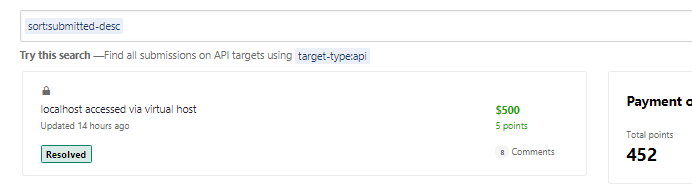
Also here’s a Common Wordlist i use to Enumerate Vhosts :)
%s 127.0.0.1 admin admin.%s administration administration.%s ads adserver alerts alpha alpha.%s ap apache api app apps appserver aptest auth backup beta beta.%s blog cdn chat citrix cms corp crs cvs dashboard database db demo dev dev.%s devel development development.%s devsql devtest dhcp direct dmz dns dns0 dns1 dns2 download en erp eshop exchange f5 fileserver firewall forum ftp ftp0 git gw help helpdesk home host http id images info internal internet intra intranet ipv6 lab ldap linux local localhost log m m.%s mail mail2 mail3 mailgate main manage mgmt mirror mobile mobile.%s monitor mssql mta mx mx0 mx1 mysql news noc ns ns0 ns1 ns2 ns3 ntp old old.%s ops oracle owa pbx portal s3 secure secure.%s server sharepoint shop sip smtp sql squid ssh ssl stage staging staging.%s stats status status.%s svn syslog test test1 test2 testing uat uat.%s upload v1 v1.%s v2 v2.%s v3 v3.%s vm vnc voip vpn web web2test whois wiki www www.%s www2 xml administrator webmail door phone lol test tester vmm local localadmin admin10 admin01 blogadmin about